Personal cold email for every lead on your list.

AI reads each lead's website, writes an email about them, and sends it from your mailboxes once you approve.

Works with what you already use

  • Google WorkspaceGmail mailboxes
  • Microsoft 365Outlook mailboxes
  • Zoho MailZoho mailboxes
  • SMTP and IMAPAny other mailbox
  • Swift PilotBuilt-in AI, pay as you go
  • Your own AI keyOpenAI, Anthropic, Gemini, OpenRouter

See how it works in one minute

Sign up in three steps, set up in five, and watch the AI write a personal email for a real lead.

A first name in a template is still a template.

People can tell when an email was sent to five hundred others. Swift Outbox writes one that could only have been sent to them.

Mail merge

Same email, 500 times

Hi {{first_name}},

I came across {{company}} and wanted to reach out. We help businesses like yours grow with proven solutions. Do you have 15 minutes this week?

  • Reads the same for everyone
  • Nothing shows you looked at their business
  • Easy to recognise, easy to ignore
Swift Outbox

Written for this lead

Hi Priya,

Congratulations on opening the Cedar Park office. Practices that lead with same-day crowns often lose those longer bookings to phone tag. Worth a 15-minute look next week?

  • Built on facts from the lead's own website
  • Your offer, tone and length, set once per campaign
  • Waits for your approval before it sends

From a spreadsheet to replies in four steps

You decide what goes out. The app does the reading, the writing and the mailbox juggling.

  1. Upload your leads

    Drop in a spreadsheet. Columns are matched for you, and paid plans can verify every address first.

  2. AI researches and writes

    It reads each lead's website and writes a one-to-one email in your voice.

  3. You approve

    Approve, edit or rewrite. Switch a campaign to automatic once you trust it.

  4. Send and get replies

    Emails go out across your mailboxes inside your limits. Replies land in one inbox.

See the app you will use every day

Real screens, sample data. Pick a part of the job.

Read every email before it goes out

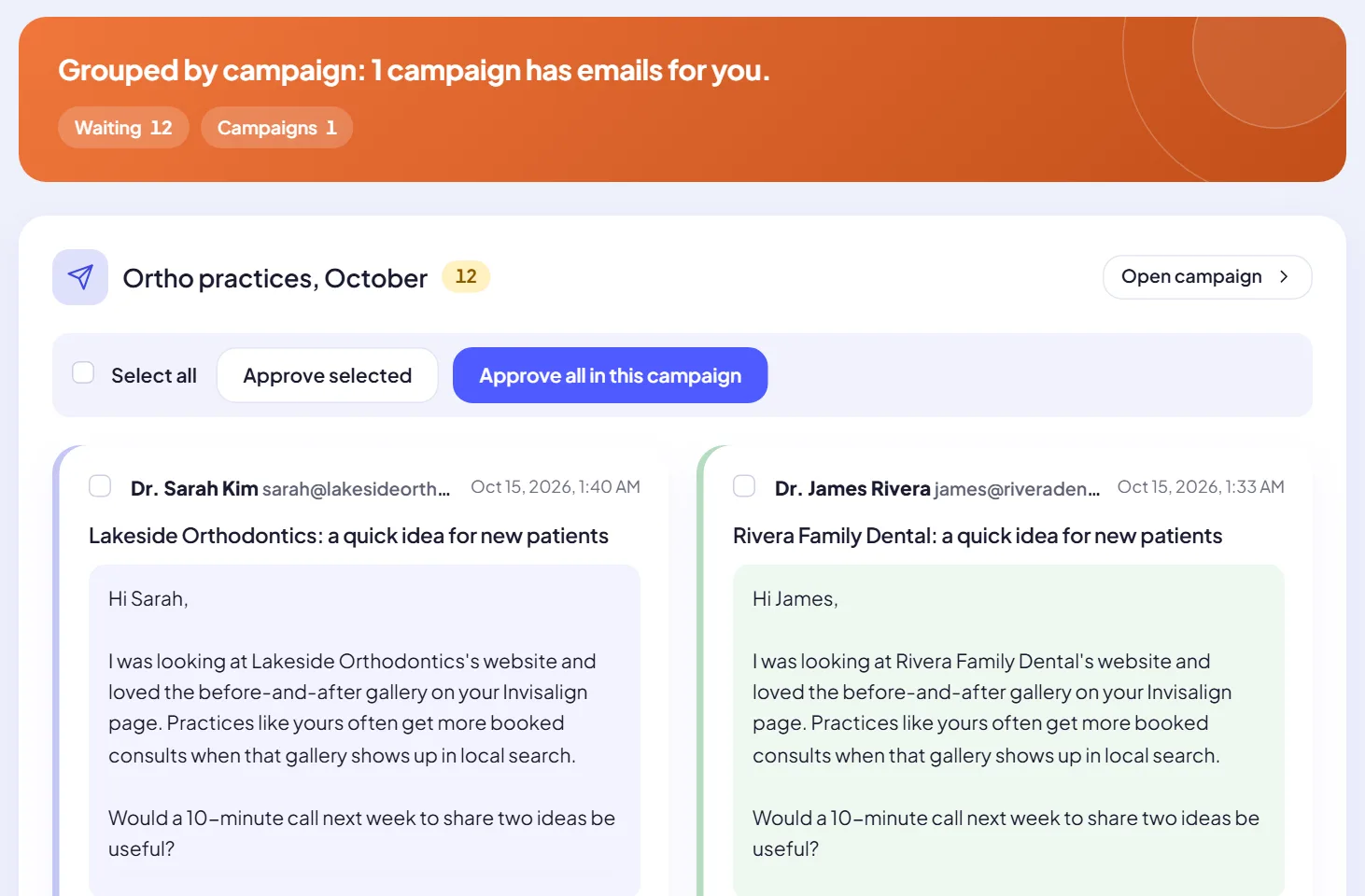
Emails wait in a review queue, grouped by campaign. Approve one, approve a whole campaign, edit a line or ask for a rewrite.

  • Approve, edit or skip each email
  • Review mode or automatic sending, per campaign
  • Live progress: written, waiting, scheduled and sent
More about this
Review emails screen: twelve emails waiting in the campaign Ortho practices, October, each written for a different dental practice, with Approve selected and Approve all buttons.

Check every address before a campaign sends

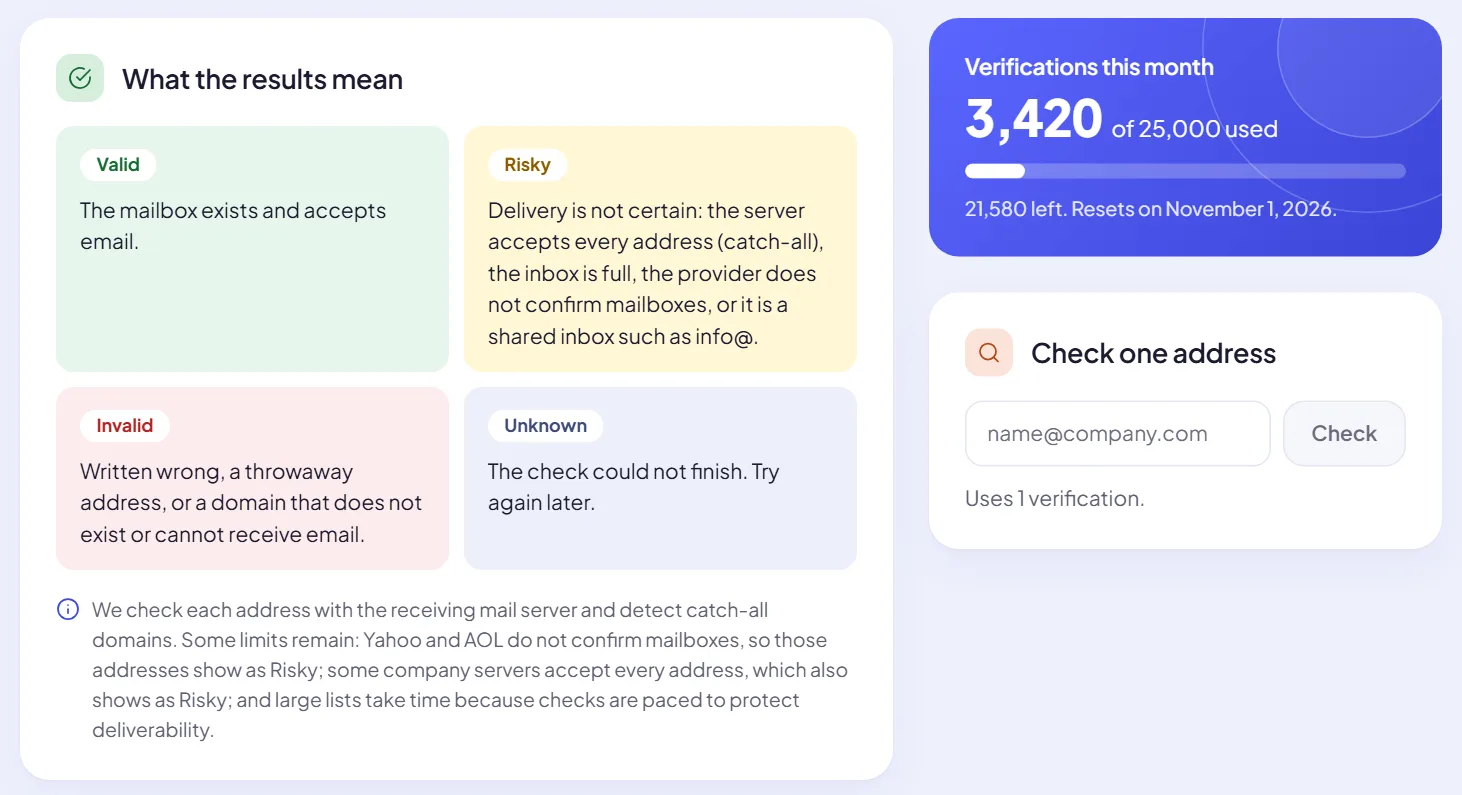
The Email verifier asks the receiving mail server whether each mailbox exists, spots catch-all domains, throwaway providers and typing mistakes, and marks every lead.

  • Valid, Risky, Invalid or Unknown for every address
  • Each campaign chooses which statuses it may email
  • Included on every paid plan
More about this
Email verifier screen: what Valid, Risky, Invalid and Unknown mean, a monthly allowance of 3,420 of 25,000 verifications used, and a box to check one address.

Every reply from every mailbox, in one inbox

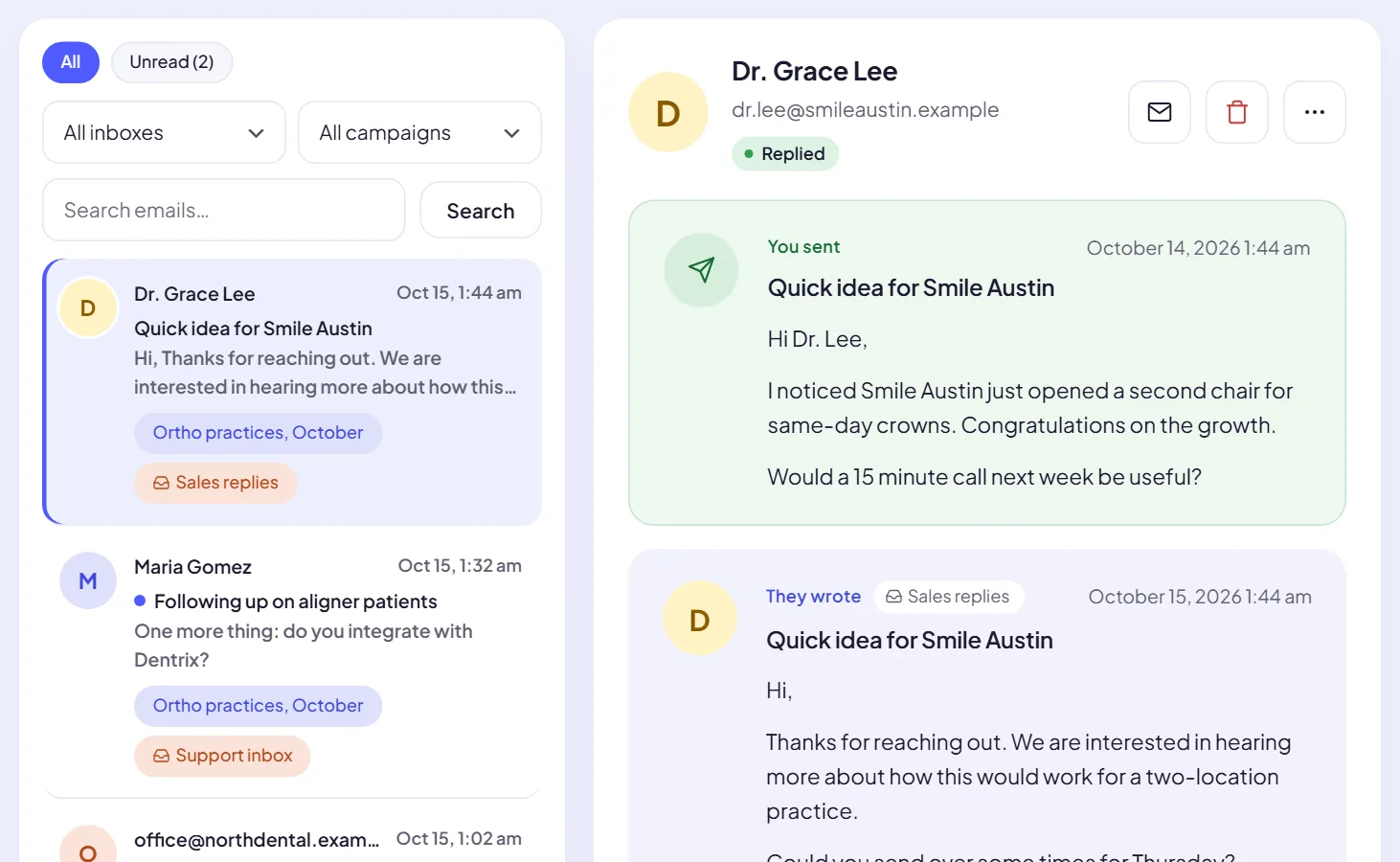
Reply mailboxes are checked on a schedule. Each reply is matched to its lead and campaign, and you answer from the right account.

  • Filter by inbox, campaign or unread
  • The email you sent and their reply, side by side
  • Answers go out through the mailbox the lead knows
More about this
Inbox screen: a list of replies from leads tagged with their campaign and inbox, and an open conversation with Dr. Grace Lee showing the email sent and her reply.

Spread sending across all your mailboxes

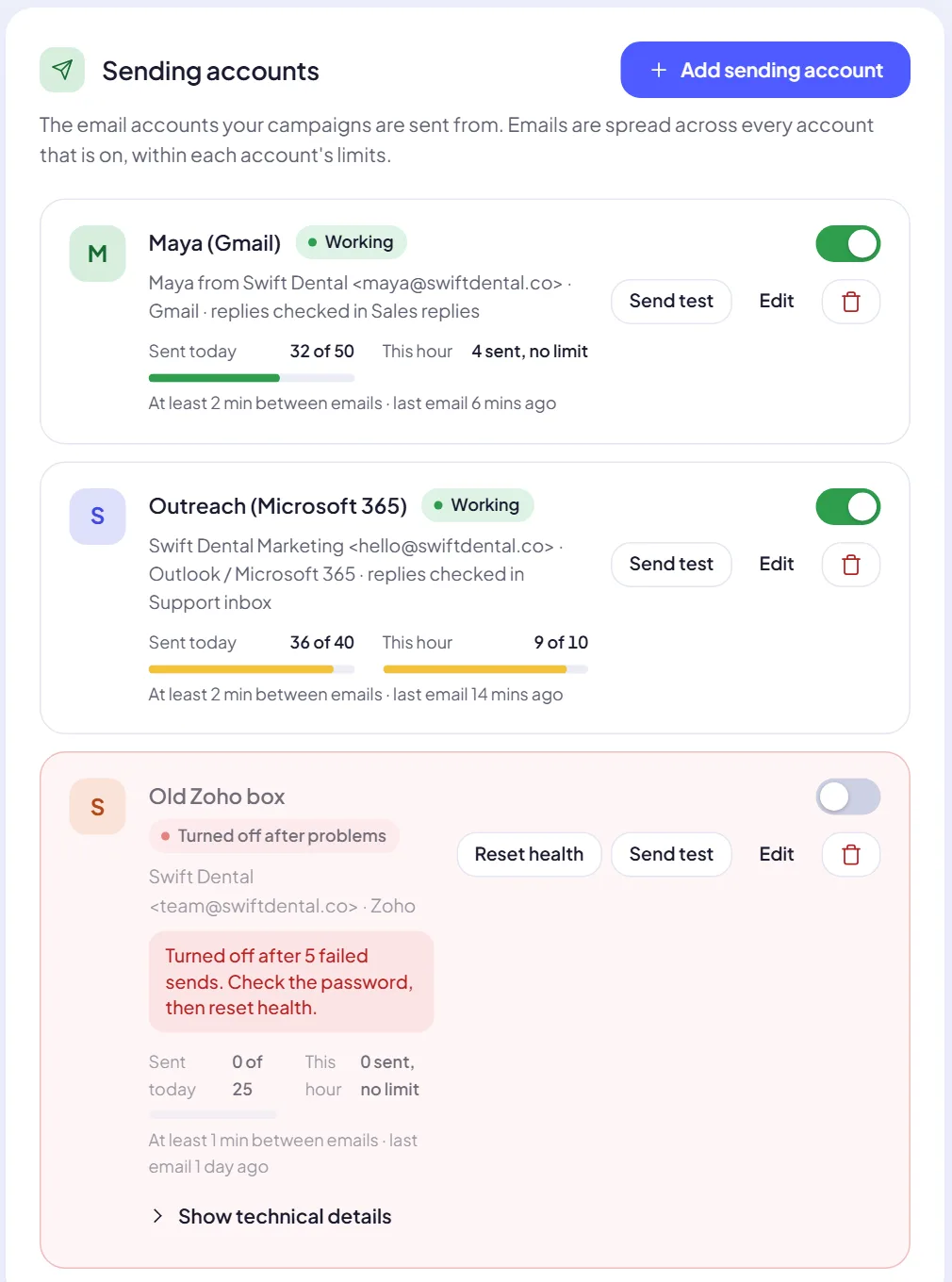
Connect Gmail, Microsoft 365, Zoho or any SMTP mailbox. Each one has its own daily and hourly limits and a gap between emails.

  • Mail goes from the mailbox with the most room left today
  • A failing mailbox is switched off and flagged
  • Send a test from any account in one click
More about this
Sending accounts screen: two working mailboxes with today and this hour counters, and a Zoho mailbox turned off after five failed sends.

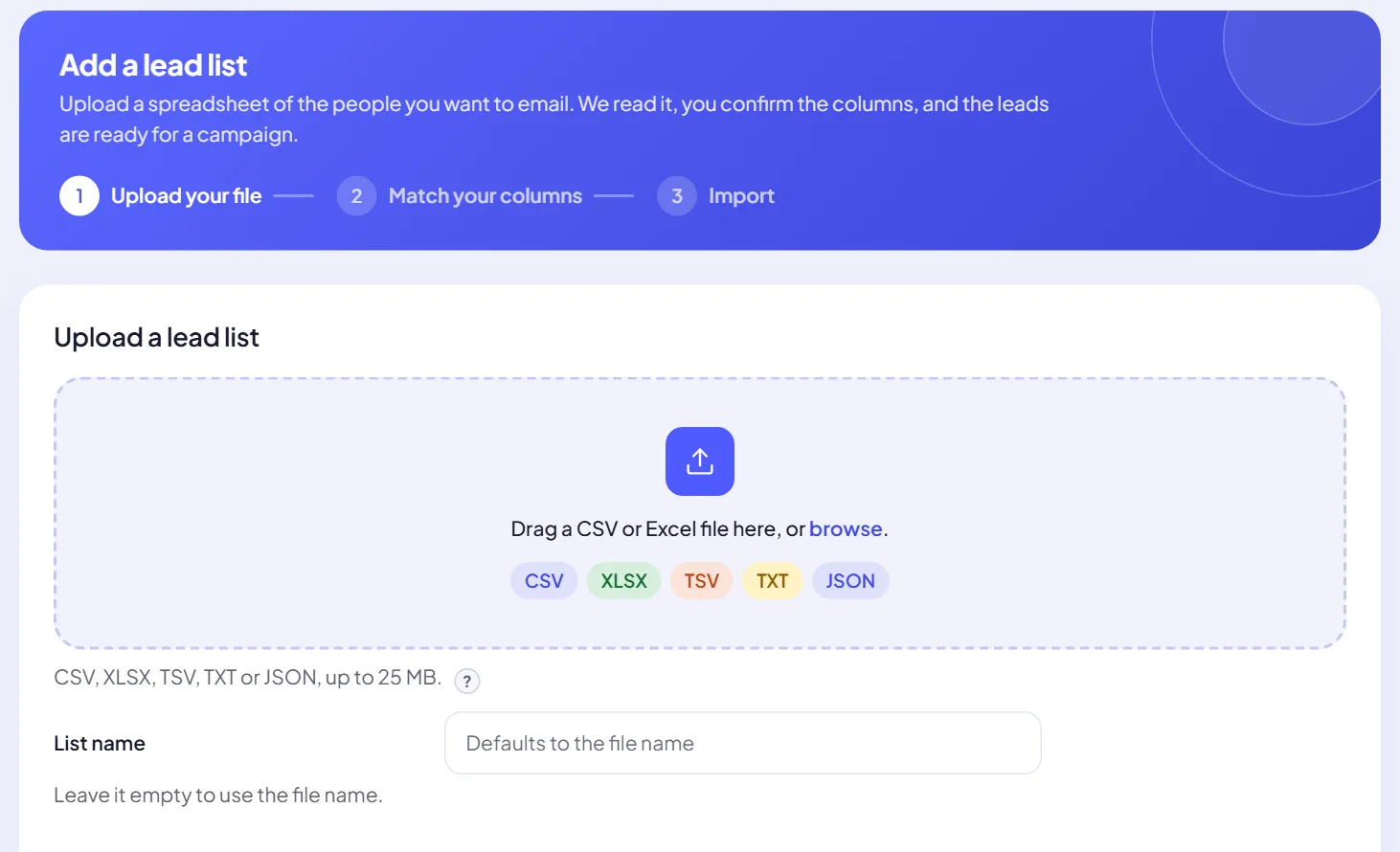
Upload a list, match the columns, done

Drop in a spreadsheet of the people you want to email. Columns are matched for you and you confirm them before anything is imported.

  • CSV, XLSX, TSV, TXT or JSON, up to 25 MB
  • Duplicates and unusable addresses are set aside
  • A website column makes the research much better
More about this
Add a lead list screen with three steps: upload your file, match your columns, import. A drop zone accepts CSV, XLSX, TSV, TXT and JSON.

Built to keep sending, and to keep your domains healthy

Mailboxes hit limits, providers rate-limit and passwords change. These are the parts that keep campaigns moving anyway.

Mail rotates across your mailboxes

Each email goes from the mailbox with the most room left today, within its daily and hourly caps. A lead always hears from the same mailbox.

Checked before sending

The Email verifier marks every lead, so bounces stay low. Paid plans.

ValidRiskyInvalidUnknown

Sending windows

Send at any time, or only between the hours you pick in your workspace time zone, with a daily limit per campaign.

One-click unsubscribe

Every email carries one. People who opt out go on a suppression list and are never emailed again.

Failing mailboxes step aside

After five failed sends in a row a mailbox is switched off and you get a notice, so one bad password never stalls a campaign.

AI that keeps writing

Add several AI connections in priority order. When one is rate limited or down, the next one takes over, so writing never stalls on a single provider.

Swift Pilot

The AI is built in. Your own key works too.

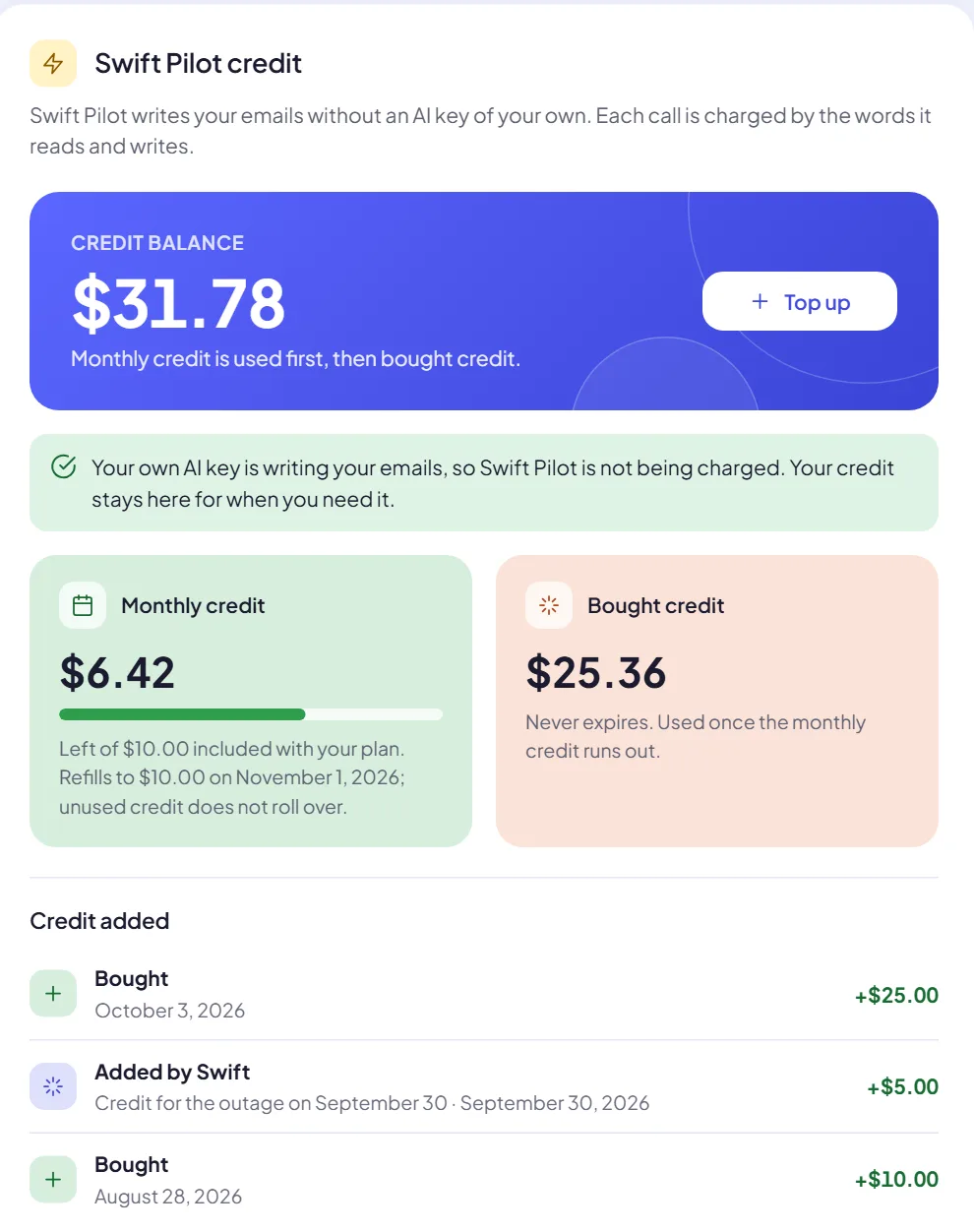
Swift Pilot writes from dollar credit included with every paid plan. Prefer your own OpenAI, Anthropic, Gemini or OpenRouter key? Connect it and Swift Pilot costs nothing.

$5a month on Starter$10a month on Growth$30a month on Agency
  • Charged by usage, for the text it reads and writes
  • Top up any time from $10. Bought credit never expires
  • Monthly credit is used first, then bought credit
Swift Pilot credit panel: a balance of $31.78 with a Top up button, $6.42 of monthly credit left and $25.36 of bought credit that never expires.

Questions people ask first

More answers in the FAQ and step-by-step guides in the docs.

Swift Support

Ask a person from inside the app. Paid plans get VIP priority, with replies usually within an hour.

Contact Swift Support
What does Swift Outbox do?

It turns a lead list into personal cold emails. For each lead it reads their website, writes a one-to-one email around what it found, waits for your approval, sends it from your mailboxes in rotation and collects replies in one inbox.

Do I need my own AI key?

No. Swift Pilot, the built-in AI, writes from dollar credit: every paid plan includes $5 on Starter, $10 on Growth and $30 on Agency each month, and you can top up any time. You can also connect your own OpenAI, Anthropic, Gemini or OpenRouter key, which costs no Swift Pilot credit.

Which mailboxes can I send from?

Any mailbox that offers SMTP for sending and IMAP for replies, including Google Workspace, Microsoft 365, Zoho and most hosting providers.

Can I check emails before they are sent?

Yes. Campaigns can wait for your approval on every email. Approve, edit or ask for a rewrite, and switch a campaign to automatic sending only when you trust it.

Is there a free plan?

Yes. The Free plan costs nothing and gives you 80 emails a day and up to 2,000 a month for one test campaign. Use your own AI key or buy Swift Pilot credit.

Are unsubscribes handled?

Yes. Every email carries a one-click unsubscribe. People who opt out go on a suppression list and are not emailed again from your workspace.

Write your first researched campaign today.

Start on the Free plan: connect a mailbox, upload a list and read the emails Swift Pilot writes before anything is sent.