Zoho Mail SMTP settings (and other IMAP providers)
Zoho Mail SMTP and IMAP servers, ports and app passwords, plus settings for Yahoo and web host mailboxes, and how to connect them for cold email.
On this page
The Zoho Mail SMTP settings are: server smtp.zoho.com (or smtppro.zoho.com for a paid account on your own domain), port 465 with SSL or 587 with TLS, your full email address as the username, and your password or a Zoho app password. For replies, use imap.zoho.com (or imappro.zoho.com), port 993, SSL, and turn on IMAP Access in Zoho Mail’s settings first. If two-factor authentication is on, you must use an app password. Any other mailbox that offers SMTP and IMAP, such as Yahoo or the email that comes with your web host, connects the same way with that provider’s server names.
Zoho Mail SMTP and IMAP settings
| Account | SMTP server | IMAP server |
|---|---|---|
| Personal or free organization (name@zohomail.com) | smtp.zoho.com | imap.zoho.com |
| Paid organization (you@yourdomain.com) | smtppro.zoho.com | imappro.zoho.com |
- SMTP ports: 465 with SSL, or 587 with TLS. Zoho does not accept port 25.
- IMAP port: 993 with SSL.
- Username: your full email address.
- From address: must be the account you log in with, or one of its aliases.
If your Zoho account lives in another data center, the server names end in that region’s domain (for example smtppro.zoho.eu or smtppro.zoho.in). Zoho shows the exact names for your account in the server configuration details of your Zoho Mail settings. Sources: Zoho SMTP server configuration and IMAP access (Zoho Mail Help).
Create a Zoho app password
- Sign in at Zoho Accounts.
- Open Security, then App passwords.
- Click Generate New Password, name it (for example “Swift Outbox”) and click Generate.
- Copy the password right away, without spaces. Zoho shows it only once.
Turn on IMAP in Zoho Mail
- In Zoho Mail, go to Settings > Mail Accounts and click your email address.
- Under IMAP, tick IMAP Access.
- Click Save.
Other providers: Yahoo and web host mailboxes
| Provider | SMTP | IMAP | Password |
|---|---|---|---|
| Yahoo Mail | smtp.mail.yahoo.com, 465 or 587, SSL | imap.mail.yahoo.com, 993, SSL | Yahoo app password |
| Your web host (cPanel, Plesk and similar) | The server your host gives, usually 465 (SSL) or 587 (TLS) | Usually 993, SSL | The mailbox password |
Source for Yahoo: IMAP server settings for Yahoo Mail (Yahoo Help). For a web host, copy the values from the “connect a mail app” or “email client settings” page in your hosting panel.
Note: Gmail, Google Workspace and Microsoft 365 have their own pages: Gmail app password for SMTP and Outlook and Microsoft 365 SMTP settings.
Connect Zoho or another mailbox in Swift Outbox
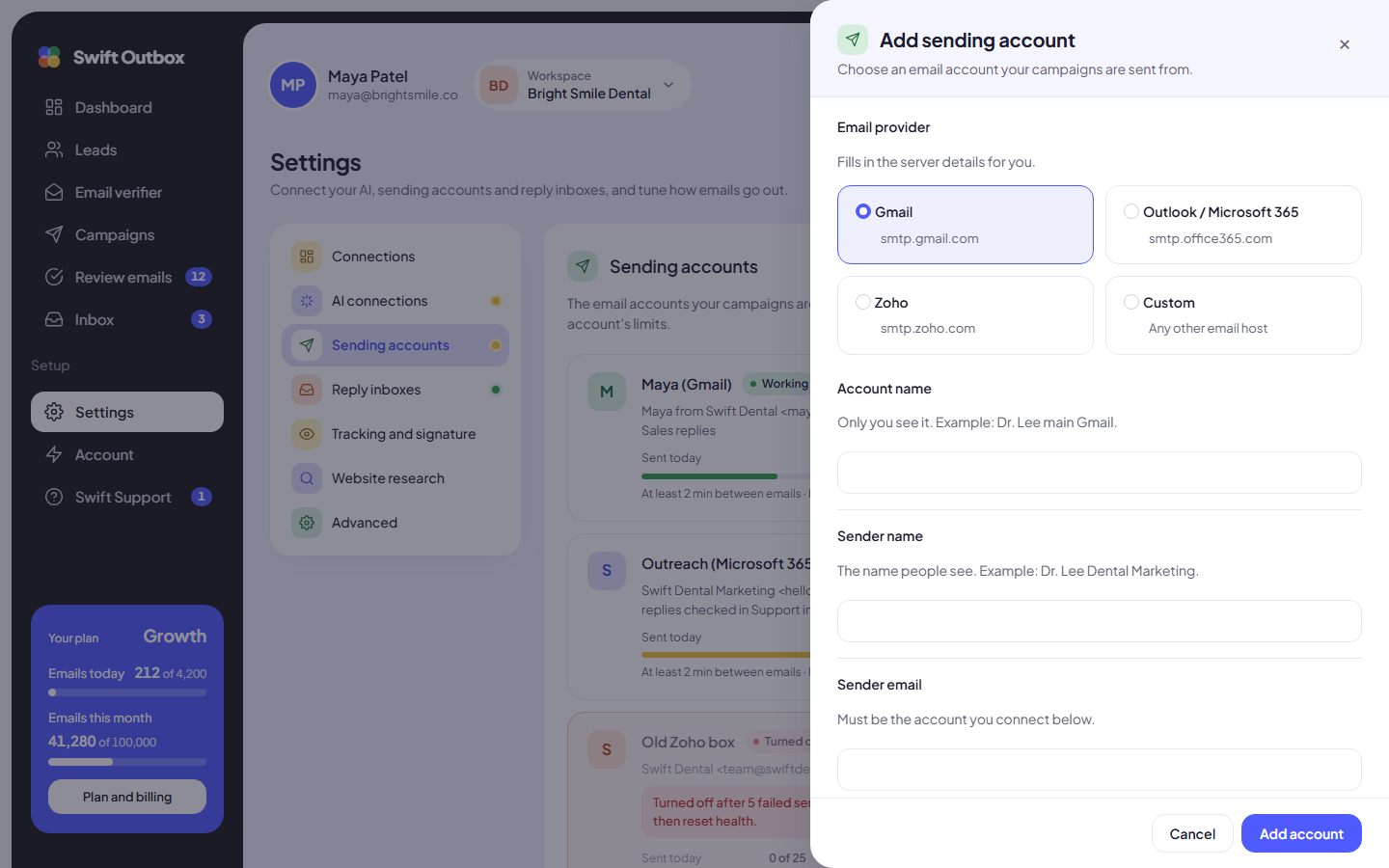
- Go to Settings > Sending accounts and click Add sending account.
- Under Email provider, pick Zoho Mail for a personal or free Zoho account (smtp.zoho.com, 465, SSL). For a paid Zoho domain account, Yahoo or your web host, pick Custom SMTP.
- Account name, Sender name and Sender email: a label for you, the name people see, and the address you connect.
- For Custom SMTP, open Server details and enter the Server, Port and Security (TLS with 587, SSL with 465). Changing any server field of a preset switches it to Custom SMTP.
- Email address or username: your full email address.
- Password or app password: paste the app password (Zoho with two-factor authentication on, Yahoo) or the mailbox password (most web hosts).
- Set the Limits and click Add account.
- Click Send test on the account row, enter an address you can check, and click Send test email. A campaign can only use the account after this test goes through.
Then add the same mailbox in Settings > Reply inboxes. The reply inbox has presets for Zoho Mail and Yahoo Mail, and Custom IMAP for anything else. Steps: How to track cold email replies with a reply inbox.
Troubleshooting Zoho Mail SMTP errors
| What you see | Likely cause and fix |
|---|---|
| 535 authentication failed | Two-factor authentication is on and you used your normal password. Create a Zoho app password. |
| Login fails with the right password | Wrong server for your account: paid domain accounts use smtppro and imappro, other data centers use their own domain. Pick Custom SMTP and enter the server Zoho lists for your account. |
| Test email fails on a web host mailbox | Wrong port and security pair. Use TLS with 587 or SSL with 465, never TLS with 465. |
| Emails rejected as “from” a different address | The Sender email must be the account you log in with or one of its aliases. |
| Reply inbox says “Saved, but we could not log in.” | IMAP Access is off in Zoho Mail settings, or the IMAP server is wrong (imap vs imappro). |
| Turned off after problems | 5 failed sends in a row turned the account off. Fix the cause, then click Reset health. |
Next step
Make sure replies show up in the app: How to track cold email replies with a reply inbox.
Common questions
What is the Zoho Mail SMTP server?
smtp.zoho.com for personal and free organization accounts, and smtppro.zoho.com for paid accounts on your own domain. Use port 465 with SSL or port 587 with TLS. Accounts in another Zoho data center use that region's domain, for example .eu or .in.
Do I need an app password for Zoho Mail?
Yes, when two-factor authentication is on. Create one in Zoho Accounts under Security, App passwords, Generate New Password. Zoho shows it only once.
Why does Zoho reject my login with error 535?
The most common causes are using your normal password while two-factor authentication is on, or the wrong server for your account type or data center (smtp vs smtppro, .com vs .eu).
Do I need to turn on IMAP in Zoho Mail?
Yes, for the reply inbox. In Zoho Mail go to Settings, Mail Accounts, pick your address and tick IMAP Access under the IMAP section, then save.
Can I use a mailbox from my web host?
Yes. Pick Custom and enter the SMTP and IMAP servers your host gives you. Most hosts use port 465 with SSL or 587 with TLS for sending, and 993 with SSL for IMAP.
Still stuck? Open a ticket from Swift Support in the app, or contact us.