Swift Pilot credit
Your monthly included credit, bought credit, how to top up, and how to read the usage history of every Swift Pilot call.
On this page
Who this is for: anyone writing emails with Swift Pilot who wants to know what it costs and how to keep it running.
Swift Pilot is paid from a credit balance in US dollars. Each call is charged by the words it reads and writes (counted in tokens), so a short email to a lead with a small website costs less than a long one.
Open Settings, AI connections and scroll to Swift Pilot credit. The Credit and usage button on the Swift Pilot row takes you there.
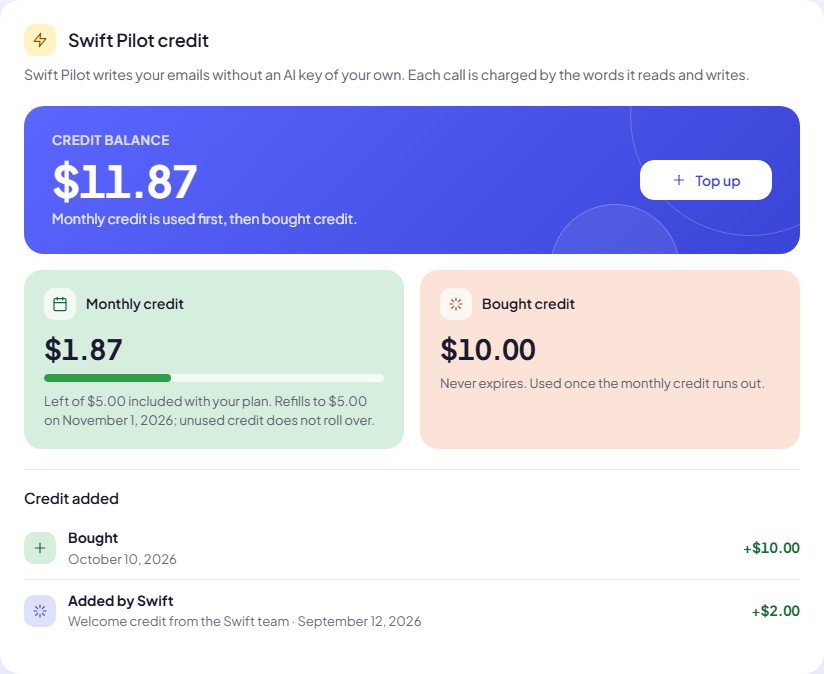
Two kinds of credit
| Monthly credit | Bought credit | |
|---|---|---|
| Where it comes from | Included with your plan | You buy it with Top up |
| Amount | Starter $5, Growth $10, Agency $30 each month (Free: none) | $10, $25, $50 or $100 per top-up |
| Expires? | Refills to the full amount on the date shown. Unused credit does not roll over. | Never expires. |
| Used | First | Once the monthly credit runs out |
The big number is your Credit balance, both together. The Credit added list shows each addition: Bought, or Added by Swift (for example a welcome credit). Click Show all to see older ones.
Top up
- Click Top up.
- Choose an amount: $10, $25, $50 or $100.
- Click Continue to pay. A secure checkout opens; tax is added at checkout, based on your country.
- Pay. You see $25.00 added to your Swift Pilot credit. If the payment takes a moment to settle, you see Payment received. Your credit shows here within a few minutes.
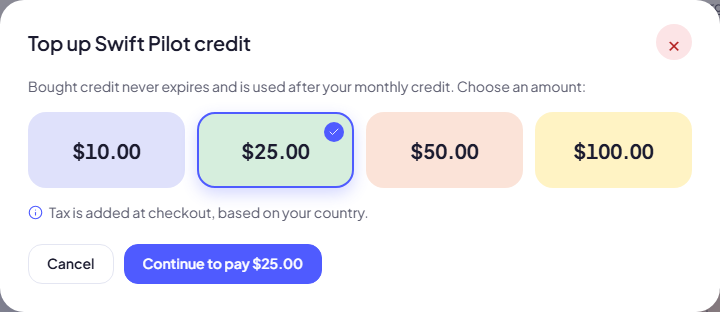
Note: Only an admin of your team can top up. Others see Only an admin of your team can top up.
Closed the checkout by mistake? You see Checkout was closed. Nothing was charged. Try again whenever you like.
When the credit runs out
If Swift Pilot is writing your emails and the balance reaches $0.00, it pauses. Nothing is lost: leads that need an email simply wait.
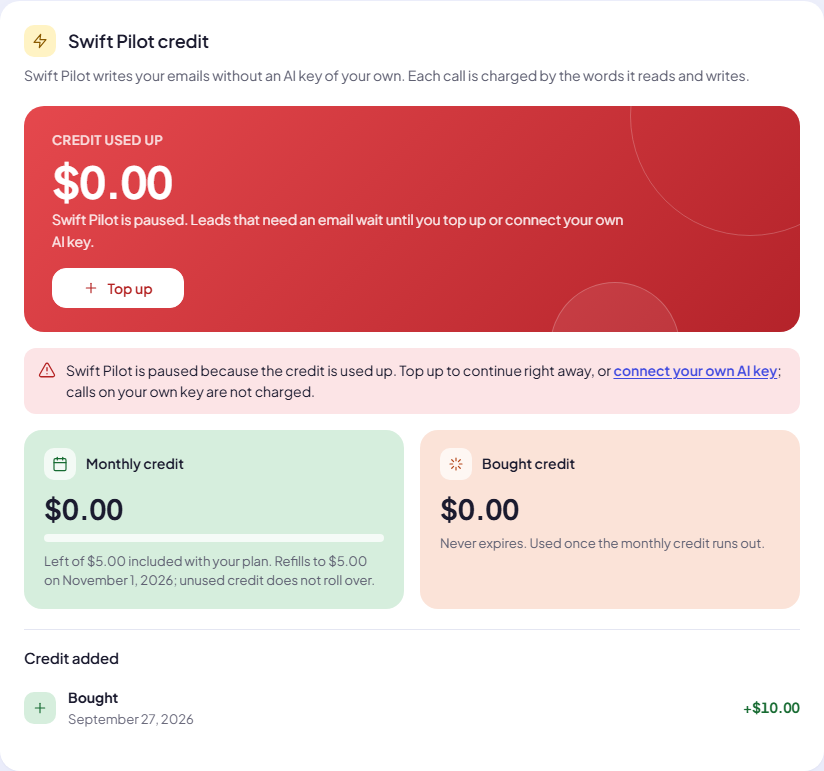
To continue, either Top up, or connect your own AI key (calls on your own key are not charged). Swift Pilot writes again as soon as there is credit.
While your own key is writing, the card says so: Your own AI key writes first and is not charged. Swift Pilot only writes, and is charged, if your own connections all fail or reach their budget.
Usage history
Under the credit, Swift Pilot usage lists every call Swift Pilot made for you and what it cost. Choose a period: This month, Last month, Last 30 days or All time.
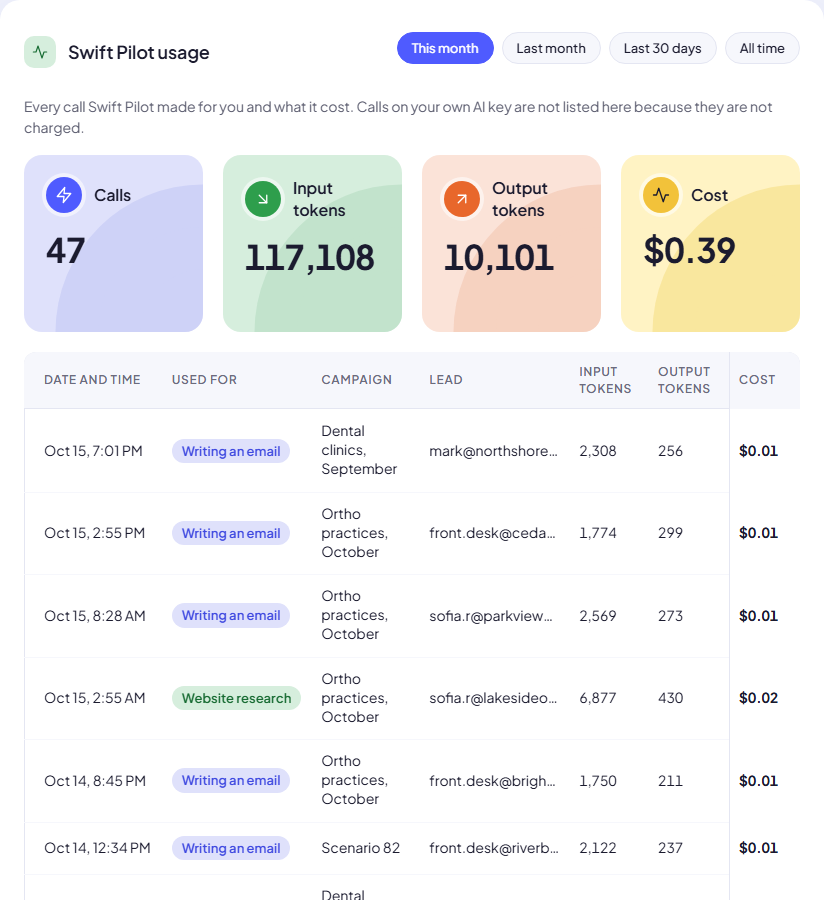
The four tiles add up the period:
- Calls: how many times Swift Pilot was used.
- Input tokens: the text it read (your instructions, the lead’s row, the website text). About 4 characters make one token.
- Output tokens: the text it wrote.
- Cost: what it cost in dollars.
Each row shows the Date and time, what it was Used for (Writing an email, Website research, Test email preview or Connection test), the Campaign, the Lead, the tokens and the Cost. Click a campaign or lead to open it. Very small costs show as < $0.01.
Calls on your own AI key are not listed here, because they are not charged.
Common questions
Why did one email cost more than another? A long website or long instructions mean more input tokens. Website research calls read the most text.
Does unused monthly credit carry over? No. Monthly credit refills to your plan amount each month and does not roll over. Bought credit stays until you use it.
Next step
Prefer to pay your AI provider directly? Connect your own AI key. Want to spend less? Control AI cost.
Still stuck? Open a ticket from Swift Support in the app, or contact us.