Check one address
Verify a single email address in seconds from the Email verifier, with a suggested fix for typos.
Who this is for: anyone who wants to check one address before adding it to a list or replying to it.
- Open Email verifier.
- In Check one address, type the address, for example
name@company.com. - Click Check.
The result appears under the box with the result, the address and the reason. When the domain looks like a typing mistake, a suggestion is shown:
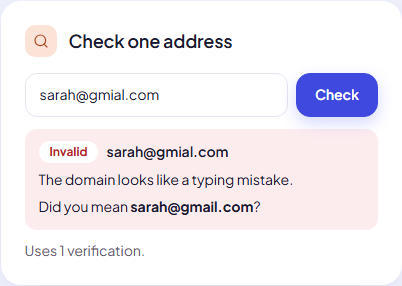
Each check uses 1 verification from your monthly allowance, whatever the result.
Good uses
- Checking an address a lead gave you on the phone before you add it to a list.
- Testing whether a company domain is catch-all: check a made-up address like
nobody-1234@company.com. If it comes back Risky with the catch-all reason, every address at that company will. - Double-checking a single Unknown result from a list run.
Note: A single check does not change any lead. To update a lead’s result, verify its list again (Unknown leads are included in Only leads not checked yet).
Next step
See every result and reason: Verification results explained.
Still stuck? Open a ticket from Swift Support in the app, or contact us.