How email verification works
What the Email verifier checks for each address, in which order, and what it can and cannot know.
Who this is for: anyone about to send to a new list who wants to know what “verified” really means.
Sending to addresses that do not exist causes bounces. Too many bounces and mailbox providers start putting your emails in spam, including the ones to good addresses. The Email verifier checks every address before a campaign sends to it, so you can leave out the bad ones.
The verifier is included in every paid plan. Open it from Email verifier in the left menu.
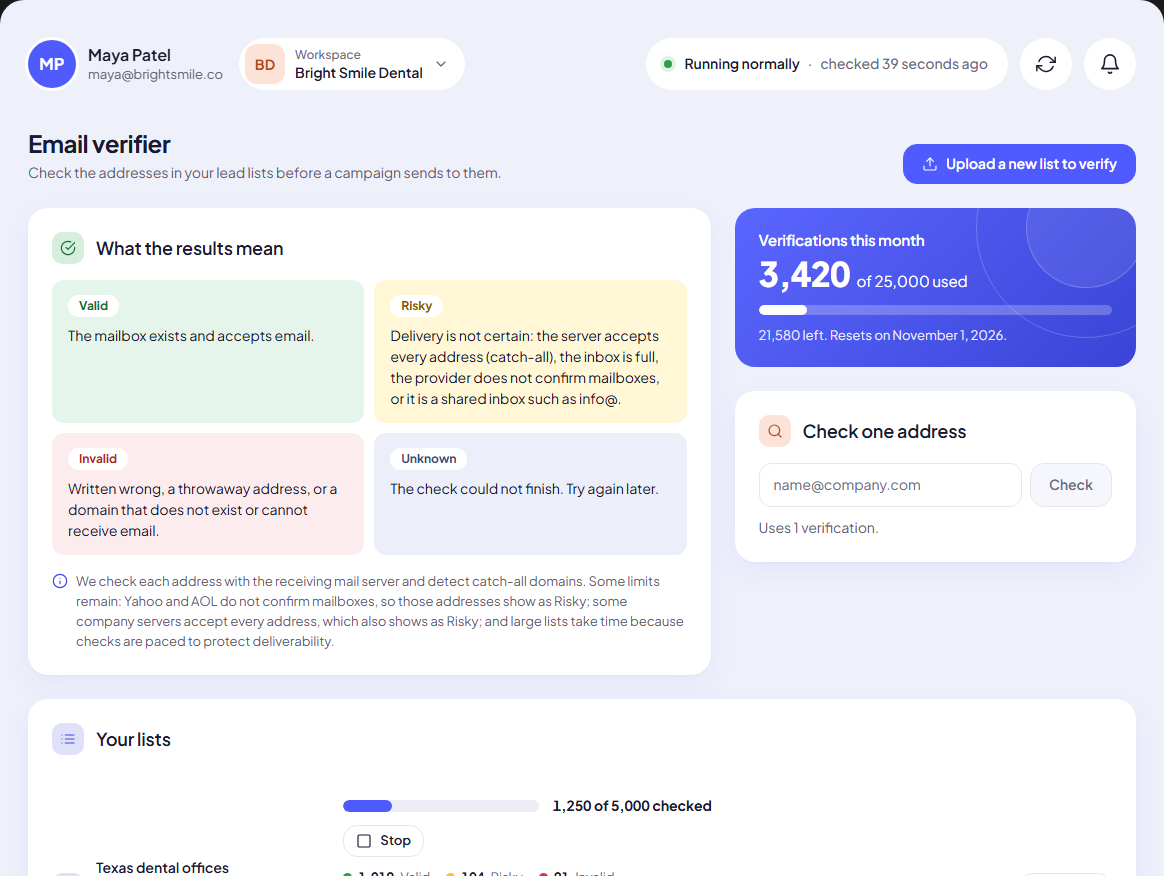
The checks, in order
Each address goes through two stages. It stops at the first check that gives a clear answer.
Stage 1: quick checks on our side
- Is there an address at all? A lead with no email is Invalid (No email address).
- Is it written correctly?
sarah@@practice, spaces or a missing domain make it Invalid (Not a valid email address). - Is the domain a typing mistake?
gmial.com,hotmial.com,yahooo.comor a.conending make it Invalid (The domain looks like a typing mistake), with a suggested fix: Did you mean sarah@gmail.com? - Is it a throwaway address? Temporary inbox providers make it Invalid (A temporary, throwaway address).
- Does the domain exist and accept email? We look up the domain’s mail records. A domain that does not exist, or that cannot receive email, makes it Invalid. If the lookup does not answer within 5 seconds, the result is Unknown and you can try again later.
- Is it a shared inbox?
info@,sales@,office@,support@,noreply@and similar are Risky (A shared inbox, not a person). They often work, but nobody in particular reads them.
Stage 2: a real mailbox check
Addresses that pass stage 1 are checked with the receiving mail server itself, without sending an email:
- Most domains (company domains, Gmail, and others): we ask the receiving server whether the mailbox exists. It can answer that the mailbox exists (Valid), does not exist (Invalid), is full (Risky), or give an answer that confirms nothing (Risky).
- Catch-all domains: some servers say yes to every address, real or not. We detect this, and those addresses are Risky (The domain accepts every address, so this mailbox cannot be confirmed).
- Microsoft personal accounts (outlook.com, hotmail, live, msn): checked through Microsoft’s own account lookup, so they get a real Valid or Invalid.
- Yahoo and AOL (including ymail and rocketmail): these providers never confirm whether an address exists. They are always Risky (Yahoo and AOL do not confirm whether an address exists).
When a mailbox check cannot finish (the server is busy, slow or unreachable), the address gets one more try at the end of the run. If that fails too, it is Unknown.
Note: No verifier can promise 100%. A mailbox can be closed the day after we check it, and catch-all or Yahoo addresses cannot be confirmed by anyone. The verifier removes the addresses that are certainly bad and tells you honestly which ones are uncertain.
What it never does
- It never sends an email to the address.
- It never changes your leads. It only adds a result. Removing leads is your decision, in Clean up a list.
Why it takes time
Mailbox checks are paced on purpose, about one per second, so receiving servers do not see us as a threat. A list of a few hundred addresses is done in minutes; a list of thousands takes a while. See Why big lists take time.
Next step
Learn what each result and reason means: Verification results explained.
Still stuck? Open a ticket from Swift Support in the app, or contact us.