Clean up a list
Remove leads from a list by verification result, such as every Invalid address, in one step.
Who this is for: anyone who has verified a list and wants the bad addresses gone for good.
Clean up removes leads from a list by their verification result. It is the fastest way to get rid of every Invalid address after a check.
Steps
- Open Email verifier and click Clean up on the list, or open the list from Leads and click Clean up at the top.
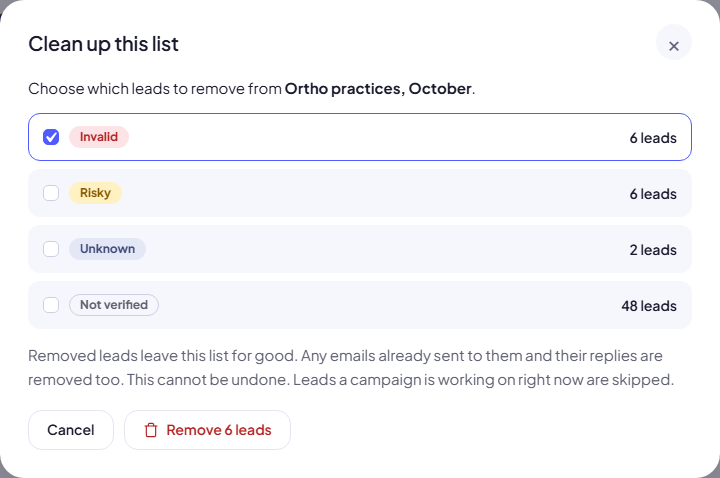
- Tick the results to remove. Invalid is ticked to begin with. You can also tick Risky, Unknown and Not verified. Each line shows how many leads it covers.
- Click Remove N leads.
When it is done you see Removed N leads.
Warning: Removed leads leave the list for good. Any emails already sent to them and their replies are removed too. This cannot be undone.
Good to know
- Leads a campaign is working on right now are skipped, so a running campaign is never broken. The message says how many: 3 were skipped because a campaign is working on them.
- Valid leads can never be removed here. The option is not offered.
- A result with no leads is greyed out.
Clean up, or just leave out?
You do not have to remove leads to keep them from being emailed. A campaign can simply leave out results you choose, and the leads stay in the list. See Choose which addresses a campaign emails.
| Choose… | When |
|---|---|
| Clean up (remove) | Invalid addresses you will never email. Keeps counts honest and lists tidy. |
| Leave out in the campaign | Risky or Unknown addresses you may email later. |
Common mistakes
- Removing Not verified leads by accident. Not verified means “not checked yet”, not “bad”. Verify first, then clean up.
- Removing Unknown leads too early. Unknown is usually temporary. Verify again with Only leads not checked yet first; most come back with a clear result.
Next step
Decide which results each campaign may email: Choose which addresses a campaign emails.
Still stuck? Open a ticket from Swift Support in the app, or contact us.